




This article is a translation and may contain errors. If anything is unclear, please refer to the original Chinese version.
orjson claims to be the fastest Python JSON library in the world. According to its README, its dumps can be up to 10x faster than the standard library json, and loads about 2x faster.
However let's build a very simple, Chinese character only test case to reveal how orjson (v3.11.3) actually behaves in terms of performance and memory usage. Firstly for dumps:
import gc
import json
import time

import orjson
import psutil

process = psutil.Process()


def get_obj():
    d = {}
    for i in range(16):
        k = "中" * (2**i)
        v = "文" * (2 ** (i + 1))
        d[k] = v
    return d


def do_test(test_cases, func):
    t0 = time.perf_counter()
    for case in test_cases:
        func(case)
    t1 = time.perf_counter()
    return t1 - t0


def test_dumps(func):
    test_cases = [get_obj() for _ in range(1000)]
    gc.collect()
    memory_before = process.memory_info().rss
    ret = do_test(test_cases, func)
    gc.collect()
    memory_after = process.memory_info().rss
    memory_increase = (memory_after - memory_before) / 1024 / 1024
    return ret, memory_increase


json_time, json_mem_inc = test_dumps(json.dumps)
orjson_time, orjson_mem_inc = test_dumps(orjson.dumps)

print(
    f"json.dumps: {json_time:.4f} seconds,",
    f"memory increase: {json_mem_inc:.2f} MB",
)
print(
    f"orjson.dumps: {orjson_time:.4f} seconds,",
    f"memory increase: {orjson_mem_inc:.2f} MB",
)
print("orjson is {:.3f}x faster than json".format(json_time / orjson_time))
Test environment: Linux, NixOS, Intel i7-13700K, Python 3.14.0. Output:
json.dumps: 0.9129 seconds, memory increase: 1.32 MB
orjson.dumps: 0.3421 seconds, memory increase: 565.32 MB
orjson is 2.669x faster than json
This is only about a quarter of the advertised 10x speedup, and it also produces ~565 MB of memory that cannot be reclaimed by Python garbage collection.
Next loads:
import gc
import json
import time

import orjson
import psutil

process = psutil.Process()

def get_str():
    parts = []
    for i in range(16):
        k = "中" * (2**i)
        v = "文" * (2 ** (i + 1))
        parts.append(f'"{k}":"{v}"')
    return "{" + ",".join(parts) + "}"


def do_test(test_cases, func):
    t0 = time.perf_counter()
    for case in test_cases:
        func(case)
    t1 = time.perf_counter()
    return t1 - t0


def test_loads(func):
    test_cases = [get_str() for _ in range(1000)]
    gc.collect()
    memory_before = process.memory_info().rss
    ret = do_test(test_cases, func)
    gc.collect()
    memory_after = process.memory_info().rss
    memory_increase = (memory_after - memory_before) / 1024 / 1024
    return ret, memory_increase


json_time, json_mem_inc = test_loads(json.loads)
orjson_time, orjson_mem_inc = test_loads(orjson.loads)

print(
    f"json.loads: {json_time:.4f} seconds,",
    f"memory increase: {json_mem_inc:.2f} MB",
)
print(
    f"orjson.loads: {orjson_time:.4f} seconds,",
    f"memory increase: {orjson_mem_inc:.2f} MB",
)
print("orjson is {:.3f}x slower than json!".format(orjson_time / json_time))
Python 3.14.0 output:
json.loads: 0.2312 seconds, memory increase: 0.00 MB
orjson.loads: 0.4873 seconds, memory increase: 562.89 MB
orjson is 2.108x slower than json!
Clearly it's more than twice slower than the standard library json, while also accumulating ~562 MB of non-GC-reclaimable memory...
Beyond orjson, let's also look at two other very popular JSON libraries: msgspec(v0.19.0) and ujson(v5.10.0). Using the same code of above with minor modifications:
-orjson_time, orjson_mem_inc = test_dumps(orjson.dumps)
+# msgspec_time, msgspec_mem_inc = test_dumps(msgspec.json.encode)  # msgspec encode
+# ujson_time, ujson_mem_inc = test_dumps(ujson.dumps)  # ujson dumps
-orjson_time, orjson_mem_inc = test_loads(orjson.loads)
+# msgspec_time, msgspec_mem_inc = test_dumps(msgspec.json.decode)  # msgspec decode
+# ujson_time, ujson_mem_inc = test_dumps(ujson.loads)  # ujson loads
On the same machine:
json.dumps: 0.9273 seconds, memory increase: 1.32 MB
msgspec.json.encode: 0.4336 seconds, memory increase: 565.71 MB
msgspec is 2.139x faster than json
json.dumps: 0.9361 seconds, memory increase: 1.32 MB
ujson.dumps: 0.5560 seconds, memory increase: 2.40 MB
ujson is 1.684x faster than json
json.loads: 0.2353 seconds, memory increase: 0.00 MB
msgspec.json.decode: 0.7281 seconds, memory increase: 566.47 MB
msgspec is 3.094x slower than json!
json.loads: 0.2362 seconds, memory increase: 0.00 MB
ujson.loads: 0.3609 seconds, memory increase: 3.27 MB
ujson is 1.528x slower than json!
So what happened in nutshell? What pitfalls should you watch out for when using third-party JSON libraries?
Let's bring these questions into the internal of CPython and library implementations, and explore best practices for JSON encoding/decoding.
PyUnicode
Before any of this discussion can hold, we need to have some insight into how CPython implements the str type. A Python str object corresponds to a PyUnicodeObject struct in CPython (hereafter PyUnicode), which stores the Unicode code points for each character. Below is a snippet from CPython 3.14.0 source, with some overly long comments removed:
typedef struct {
    PyObject_HEAD
    Py_ssize_t length;          /* Number of code points in the string */
    Py_hash_t hash;             /* Hash value; -1 if not set */
#ifdef Py_GIL_DISABLED
   _Py_ALIGN_AS(4)
#endif
    struct {
#ifdef Py_GIL_DISABLED
        unsigned char interned;
#else
        unsigned int interned:2;
#endif
        unsigned int kind:3;
        unsigned int compact:1;
        unsigned int ascii:1;
        unsigned int statically_allocated:1;
#ifndef Py_GIL_DISABLED
        unsigned int :24;
#endif
    } state;
} PyASCIIObject;

typedef struct {
    PyASCIIObject _base;
    Py_ssize_t utf8_length;     /* Number of bytes in utf8, excluding the
                                 * terminating \0. */
    char *utf8;                 /* UTF-8 representation (null-terminated) */
} PyCompactUnicodeObject;

typedef struct {
    PyCompactUnicodeObject _base;
    union {
        void *any;
        Py_UCS1 *latin1;
        Py_UCS2 *ucs2;
        Py_UCS4 *ucs4;
    } data;                     /* Canonical, smallest-form Unicode buffer */
} PyUnicodeObject;
Given this memory layout, at runtime, the memory behind a PyUnicodeObject* pointer can also be interpreted as PyASCIIObject or PyCompactUnicodeObject. The number of Unicode code points — i.e., the string length — is stored in PyASCIIObject.length. The string state is described by the state field in PyASCIIObject, where some of the bitfields/fields are not essential for this article:
interned: hints how CPython should treat the object during cleanup.statically_allocated: whether the string's memory is statically allocated.compact: whether the string is "compact", i.e., whether the actual string data is placed in the same memory block as thePyUnicodeObject, immediately following the struct. Due to CPython's inheritance layout, subclasses ofstrneed spaces for extra attributes afterPyUnicodeObject, so they are not compact. This article focuses only on plainstrobjects (not subclasses), so we assume this is always 1 in the discussion below.
Depended on internal Unicode data, a PyUnicodeObject can take one of four storage forms:
- If all code points are within ASCII range, i.e.
[0x0, 0x7f]: the layout isPyASCIIObject, and the string data follows immediately, 1 byte per code point, NULL-terminated. Memory usage issizeof(PyASCIIObject) + (length + 1) * 1. Because it only stores ASCII, this storage format conforms to UTF-8. - If the maximum code point is within
[0x80, 0xff]: usePyCompactUnicodeObjectwhere the string data following immediately. Since all code points fit inuint8_t, it stores 1 byte per code point, NULL-terminated. Memory usage issizeof(PyCompactUnicodeObject) + (length + 1) * 1. This format is not UTF-8 but rather ISO/IEC 8859-1 (Latin-1). - If the maximum code point is within
[0x100, 0xffff]: still usePyCompactUnicodeObject, but code points requireuint16_t. Each code point occupies 2 bytes, and the data is terminated by(uint16_t)0. Memory usage issizeof(PyCompactUnicodeObject) + (length + 1) * 2. - If the maximum code point is within
[0x10000, 0x10ffff]: requireuint32_t. Each code point occupies 4 bytes, and the data is terminated by(uint32_t)0. Memory usage issizeof(PyCompactUnicodeObject) + (length + 1) * 4.
Except for the first case, pure-ASCII, none of the other storage formats conform to UTF-8 encoding. As an aside, this storage strategy has pros and cons. One upside is that finding the n-th character is extremely fast because each character has fixed width --- many string algorithms become simpler for the same reason. One downside is that a single high code point can drastically increase memory usage --- inserting an emoji into otherwise English text can quadruple the string's memory footprint, because emoji code points are above 0x10000.
If you have ever written Python C extensions, you have likely used the handy API PyUnicode_AsUTF8AndSize. It converts a PyUnicode to a C-style UTF-8 string and returns its length. More conveniently, per its documentation, the caller does not need to manage its lifetime.
This caches the UTF-8 representation of the string in the Unicode object, and subsequent calls will return a pointer to the same buffer. The caller is not responsible for deallocating the buffer. The buffer is deallocated and pointers to it become invalid when the Unicode object is garbage collected.
However, when a string is not pure ASCII, its internal PyUnicode storage is not UTF-8. Particular the documented cache is stored in the utf8 field of PyCompactUnicodeObject and length in utf8_length. When PyUnicode_AsUTF8AndSize being called, the following occurs:
- If the string is pure ASCII, CPython can directly return the pointer at offset
sizeof(PyASCIIObject)and thelengthfromPyASCIIObject. -
Otherwise, if
utf8is non-null, it returnsutf8andutf8_length. -
If
utf8is null, CPython computes the UTF-8 representation via its UTF-8 encoder implementation. It allocates memory viaPyMem_Malloc, copies the encoded content into that buffer, then stores the pointer and length intoutf8andutf8_lengthfields. Then returns them to the caller.
Notably, calling str.encode("utf-8") in Python does not populate this cache. As far as the author knows, the cache is only written when the C API is invoked and a C-style UTF-8 string is needed. The cached UTF-8 buffer stored in utf8 will be freed when the PyUnicode's refcount drops to zero and its memory is freed. This is precisely why callers need not free the buffer returned by PyUnicode_AsUTF8AndSize.
By this point you may already suspect: the "non-GC-reclaimable" memory observed in the earlier benchmarks for orjson and msgspec comes from the PyUnicode UTF-8 cache.
Serialization
orjson.dumps and msgspec.json.encode return UTF-8 encoded bytes (output type). This differs from the standard library. From a design perspective, reasonable people may disagree on whether serializing to str or to bytes is more correct. In the author's view, serializing to UTF-8 bytes is actually more aligned with high-performance scenarios. Per RFC 8259, JSON should be encoded as UTF-8. In most real-world use cases, serializing JSON is primarily designed for storage like files/databases or sending over the network as a byte stream. For both, UTF-8 bytes are the best fit representation. In json.dumps, ensure_ascii option defaults to True, which forces the output to be pure ASCII. This makes PyUnicode's internal storage UTF-8 compatible and avoids extra UTF-8 encoding work at runtime. However, ensure_ascii makes each non-ASCII character take at least 6 bytes, which is terrible for storage/transfer and makes JSON nearly unreadable.
At the same time, returning bytes also creates room for benchmark gaming by orjson and msgspec.
Firstly let's briefly outline what happens in orjson.dumps while handling non-ASCII strings. According to the source, orjson processes PyUnicode using an unsafe function:
    #[inline(always)]
    #[cfg(target_endian = "little")]
    pub fn to_str(self) -> Option<&'static str> {
        unsafe {
            let op = self.ptr.as_ptr();
            if unlikely!((*op.cast::<PyASCIIObject>()).state & STATE_COMPACT == 0) {
                to_str_via_ffi(op)
            } else if (*op.cast::<PyASCIIObject>()).state & STATE_COMPACT_ASCII
                == STATE_COMPACT_ASCII
            {
                let ptr = op.cast::<PyASCIIObject>().offset(1).cast::<u8>();
                let len = isize_to_usize((*op.cast::<PyASCIIObject>()).length);
                Some(str_from_slice!(ptr, len))
            } else if (*op.cast::<PyCompactUnicodeObject>()).utf8_length > 0 {
                let ptr = ((*op.cast::<PyCompactUnicodeObject>()).utf8).cast::<u8>();
                let len = isize_to_usize((*op.cast::<PyCompactUnicodeObject>()).utf8_length);
                Some(str_from_slice!(ptr, len))
            } else {
                to_str_via_ffi(op)
            }
        }
    }
In summary:
- If the PyUnicode is not compact (common for
strsubclasses), callto_str_via_ffito create a Rust string. - Otherwise, if the PyUnicode is pure ASCII, build a string directly from its internal data and length.
- Otherwise, if
utf8_length > 0, build a string from the cached UTF-8 buffer and its length. - Otherwise, call
to_str_via_ffi.
to_str_via_ffi is essentially a call to PyUnicode_AsUTF8AndSize:
fn to_str_via_ffi(op: *mut PyObject) -> Option<&'static str> {
    let mut str_size: pyo3_ffi::Py_ssize_t = 0;
    let ptr = ffi!(PyUnicode_AsUTF8AndSize(op, &mut str_size)).cast::<u8>();
    if unlikely!(ptr.is_null()) {
        None
    } else {
        Some(str_from_slice!(ptr, str_size as usize))
    }
}
Now it is very obvious: due to the behavior of PyUnicode_AsUTF8AndSize, as long as a typical compact non-ASCII PyUnicode is passed through orjson.dumps, its UTF-8 cache will inevitably be created. When repeatedly calling orjson.dumps on the same object, aside from the first call which is slowed down by the heavy PyUnicode_AsUTF8AndSize path, subsequent calls essentially only do two things for the string object: copy the cached buffer from utf8 into the output JSON buffer, and add backslashes for escaping when needed. Let's test how much time that UTF-8 cache saves in the initial example:
import time

import orjson


def get_obj():
    d = {}
    for i in range(16):
        k = "中" * (2**i)
        v = "文" * (2 ** (i + 1))
        d[k] = v
    return d


def do_test(test_cases, func):
    t0 = time.perf_counter()
    for case in test_cases:
        func(case)
    t1 = time.perf_counter()
    return t1 - t0


def test_dumps(func):
    test_cases = [get_obj() for _ in range(1000)]
    ret = do_test(test_cases, func)
    return ret


def test_dumps_cached(func):
    obj = get_obj()
    test_cases = [obj for _ in range(1000)]
    ret = do_test(test_cases, func)
    return ret


time_no_cache = test_dumps(orjson.dumps)
time_cached = test_dumps_cached(orjson.dumps)
time_saved = time_no_cache - time_cached
time_no_cache_per_call = time_no_cache / 1000
time_saved_per_call = time_saved / (1000 - 1)  # except the first call with no cache
time_saved_percent = (time_saved / time_no_cache) * 100

print(f"Time without cache: {time_no_cache:.6f} seconds")
print(f"Time with cache: {time_cached:.6f} seconds")
print(f"Time saved percent: {time_saved_percent:.2f}%")
Output:
Time without cache: 0.356424 seconds
Time with cache: 0.077149 seconds
Time saved percent: 78.35%
Thus we located the "missing" three quarters of the serialization speed. At this point, the initial mystery around dumps speed and memory growth is resolved. As for msgspec, its implementation is quite similar:
/* XXX: Optimized `PyUnicode_AsUTF8AndSize` for strs that we know have
 * a cached unicode representation. */
static inline const char *
unicode_str_and_size_nocheck(PyObject *str, Py_ssize_t *size) {
    if (MS_LIKELY(PyUnicode_IS_COMPACT_ASCII(str))) {
        *size = ((PyASCIIObject *)str)->length;
        return (char *)(((PyASCIIObject *)str) + 1);
    }
    *size = ((PyCompactUnicodeObject *)str)->utf8_length;
    return ((PyCompactUnicodeObject *)str)->utf8;
}

/* XXX: Optimized `PyUnicode_AsUTF8AndSize` */
static inline const char *
unicode_str_and_size(PyObject *str, Py_ssize_t *size) {
    const char *out = unicode_str_and_size_nocheck(str, size);
    if (MS_LIKELY(out != NULL)) return out;
    return PyUnicode_AsUTF8AndSize(str, size);
}
Deserialization
Based on the analysis above, we can roughly infer what happened inside orjson and msgspec during the original deserialization benchmark from the memory increase alone. Due to space limitations, we only discuss orjson here. The conclusion: it first converts the str into UTF-8, and then deserializes. Let's again test how much the cache helps orjson:
import json
import time

import orjson


def get_str():
    parts = []
    for i in range(16):
        k = "中" * (2**i)
        v = "文" * (2 ** (i + 1))
        parts.append(f'"{k}":"{v}"')
    return "{" + ",".join(parts) + "}"


def do_test(test_cases, func):
    t0 = time.perf_counter()
    for case in test_cases:
        func(case)
    t1 = time.perf_counter()
    return t1 - t0


def test_loads(func):
    test_cases = [get_str() for _ in range(1000)]
    ret = do_test(test_cases, func)
    return ret


def test_loads_cached(func):
    obj = get_str()
    test_cases = [obj for _ in range(1000)]
    ret = do_test(test_cases, func)
    return ret


time_no_cache = test_loads(orjson.loads)
time_cached = test_loads_cached(orjson.loads)
json_time_cached = test_loads_cached(json.loads)

print(f"orjson time without cache: {time_no_cache:.6f} seconds")
print(f"orjson time with cache: {time_cached:.6f} seconds")
print(f"json time with cache: {json_time_cached:.6f} seconds")
Output:
orjson time without cache: 0.495174 seconds
orjson time with cache: 0.222165 seconds
json time with cache: 0.231520 seconds
This raises a new question: why is there no significant speedup over the standard library when the cache exists?
orjson's deserialization logic is not written in Rust. It is based on the popular open-source C JSON parser yyjson, used as a backend. The two yyjson traits relevant here are: (1) it is very fast at parsing, and (2) its output structure is a custom, very simple representation. Many user-friendly JSON libraries parse arrays into random-access containers and objects into key-value maps — for example, the popular C++ parser nlohmann/json parses arrays/objects into std::vector/std::unordered_map. yyjson parses arrays into linked lists, and its object representation does not support O(1) key lookup. In some sense, yyjson shifts work from parsing time to access time.
In the author's view, for Python (and other languages), choosing yyjson as a backend has a straightforward benefit: it can parse JSON into a low-cost "intermediate representation", making downstream processing easy. orjson then walks yyjson's parsed result to construct Python objects. Naturally, this introduces a problem: yyjson is a C library whose input/output strings are C-style UTF-8 strings; therefore, when parsing non-ASCII JSON, there is extra overhead both to convert input to UTF-8 for yyjson, and to construct PyUnicode from yyjson's output.
This explains the earlier question. When loads takes str (PyUnicode), both input and output are PyUnicode, and logically there is nothing inherently tied to UTF-8. The standard library's JSON encode/decode does not involve any UTF-8 transcoding. But orjson.loads performs two redundant conversions; effectively it is a "compatibility" layer so users need not explicitly call str.encode("utf-8") before passing data in. Because the input to loads is an entire JSON document, the worst case is: as long as there is any non-ASCII character anywhere, the entire JSON must be UTF-8 encoded once (and cached), wasting substantial time and memory. Hence, no matter how fast yyjson is, orjson can be bottlenecked by the two extra UTF-8 encode/decode steps. PyUnicode's UTF-8 cache can only save the first encoding step; it cannot eliminate the final UTF-8 decoding cost. This resolves both the original problem and the newly raised one.
ujson
The ujson maintainers no longer recommend using this library; see Project status.
ujson has been popular since the Python 2 era. Back then, string objects were byte-based, so assuming UTF-8, dumps was mostly copying and escaping, and a straightforward implementation could achieve high performance. But in Python 3, where str internals changed substantially, ujson.dumps offers no clear advantage. ujson.dumps returns str like the standard library, but it first encodes strings to UTF-8 for processing; ujson.loads has the same issue. In the initial example, ujson does not introduce extra memory overhead because its core string transcoding logic (dumps, loads) uses PyUnicode_AsEncodedString. This API encodes PyUnicode into a UTF-8 bytes (i.e., PyBytesObject), and then extracts the UTF-8 string from it — behavior very similar to writing str.encode("utf-8") in Python. The resulting PyBytes is detached from the original PyUnicode's lifetime; CPython does not populate the UTF-8 cache for this operation. Thus in benchmarks, repeated runs on the same object do not get accelerated as orjson/msgspec; and because the temporary PyBytes is freed, it does not accumulate unreclaimable memory.
When ujson writes output strings, it decodes Unicode from the UTF-8 bytes obtained earlier, writes the values into a u32 array, and then calls PyUnicode_FromKindAndData to create the final Python string. In other words, ujson implements UTF-8 decoding itself, and this implementation is faster than CPython's, which is why ujson.loads is faster than orjson and msgspec in the initial benchmark. When ujson.loads is given bytes, the entire process avoids the UTF-8 decoding overhead of converting strings, so in some non-ASCII-heavy scenarios ujson can be expected to outperform orjson and msgspec. Beyond that, however, ujson's implementation is relatively naive: encoding/decoding is character-by-character, without SIMD-accelerated copying as in orjson; number parsing and other conversions are also fairly conventional.
Sound Design
Below are the author's practical views on what an ideal high-performance Python JSON library should look like:
- Implement for real-world JSON parsing scenarios (not benchmarks oriented), or you will easily fall into traps such as cache effects.
- From a usability perspective, having
dumpsreturn UTF-8bytesis resonable. But as validated above, for non-ASCII, the biggest cost in JSON encode/decode is often UTF-8 transcoding. The purpose of a high-performance JSON library is to replace the standard library's slower (though more compatible) implementation, so it is entirely reasonable for the third-party library to solve UTF-8 encoding/decoding using high-performance techniques. - It is correct to either use or not use PyUnicode's UTF-8 cache in
dumps, but a better design is to allow users to control whether the cache is written. In particular, for non-ASCII strings that are dumped once and then discarded, creating the cache costs at least one (often two)PyMem_Malloccalls plus one copy, and increases memory peak proportional to string length; a single JSON document can contain thousands of strings. In such cases, not writing the cache can be a win for both time and memory. - In practice,
dumpstostris still extremely useful. In Python's philosophy,stris the universal "string" type. Many APIs expectstr; if you havebytes, you must callbytes.decodeto get astr, which is unfriendly. Also, for drop-in replacement, returningstrmakes it easier and more efficient. Overall, if a library supportsdumpstostr,dumpstobytes,loadsfromstr, andloadsfrombytes, its API will be quite user-friendly. - An efficient
loads from strshould involve only copying/converting amongu8,u16, andu32Unicode arrays, and should not involve any UTF-8 encoding. - Number parsing and number-to-string conversion should use the most efficient available algorithms.
So, is there any high-performance JSON library that fits these principles? This leads us to the protagonist of this article: ssrJSON.
ssrJSON
ssrJSON is a JSON parsing library designed with performance as the top priority.
On the serialization side, ssrJSON provides both dumps and dumps_to_bytes. For compact PyUnicode, JSON serialization (including UTF-8 encoding) is implemented entirely with SIMD; float-to-string conversion uses dragonbox, a design that aligns in many ways with V8's JSON handling (V8). For loads, it directly rewrites yyjson with SIMD into a version perfectly suited for Python, while incorporating advantages from other Python JSON libraries. ssrJSON automatically selects the appropriate SIMD implementation based on hardware tier: on x86 it supports SSE4.2 through AVX512, on ARM it supports NEON, and it is highly optimized with Clang — pushing performance to the limit. As of now (December 2025, to the author's knowledge), ssrJSON is the best overall general-purpose Python JSON library in terms of combined performance.
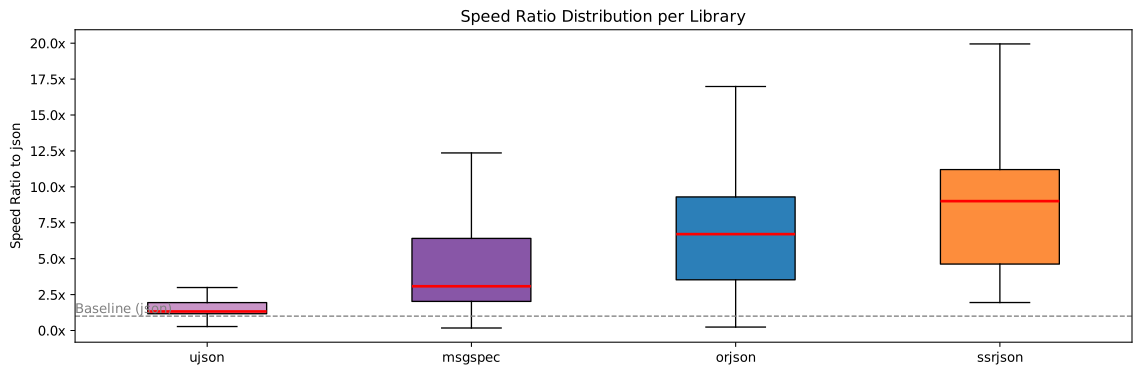
The benchmark results below are produced by the ssrJSON-benchmark project. It tests multiple libraries under realistic JSON usage patterns, including whether the input has a UTF-8 cache, and measures interface call timings in C. Compared to simpler benchmarks that ignore cache effects, ssrJSON-benchmark's conclusions are more reliable. The figure below shows the distribution of speedup ratios relative to the standard library; ssrJSON is clearly ahead. (All figures below are taken from ssrJSON-benchmark's full results for ssrJSON v0.0.9: full report. Test environment: Linux, NixOS, Intel i7-13700K, Python 3.14.0.)
ssrJSON's dumps_to_bytes is similar to orjson.dumps and msgspec.json.encode in that it returns bytes, but it allows users to control whether the UTF-8 cache is written.
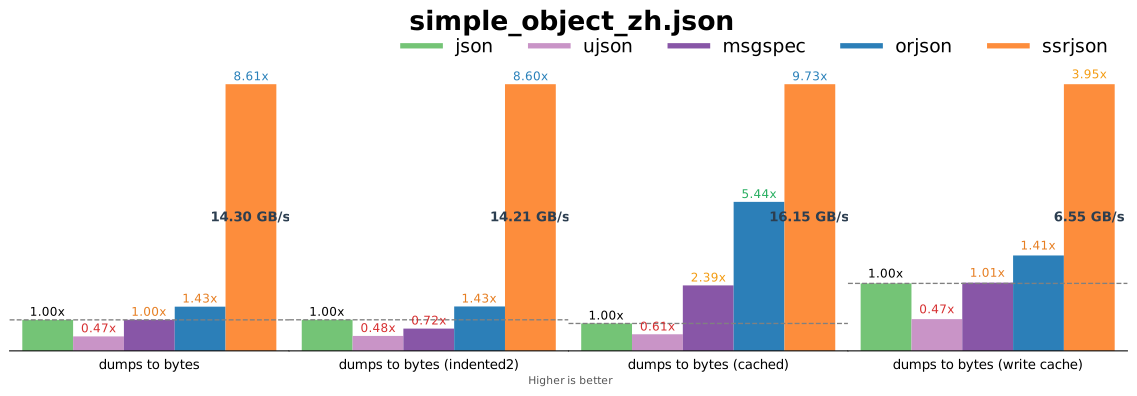
The four bar charts below are dumps_to_bytes benchmarks for a Chinese-only test case, comparing fast-path non-ASCII performance when output is UTF-8 bytes. Since the standard library json and ujson do not directly support bytes output, the benchmark times dumps(...).encode("utf-8") for them. Charts 1–2 measure the no-cache case with ssrJSON not writing caches (Chart 2 uses indent=2; note msgspec does not natively support indentation, so the test adds an extra msgspec.json.format call). Chart 3 measures performance when the input already has a cache. Chart 4 is again no-cache, but with ssrJSON's cache writing enabled, to evaluate that mode. Because ssrJSON uses SIMD for UTF-8 encoding, it is significantly faster than other libraries in the no-cache cases. With cache already present (essentially a pure memory-copy race), it is even faster and still clearly ahead. Compared to the full pipeline of json.dumps followed by str.encode("utf-8"), orjson and msgspec largely just move CPython's UTF-8 encoding to a different point in the pipeline, so they show no clear advantage in the no-cache case.
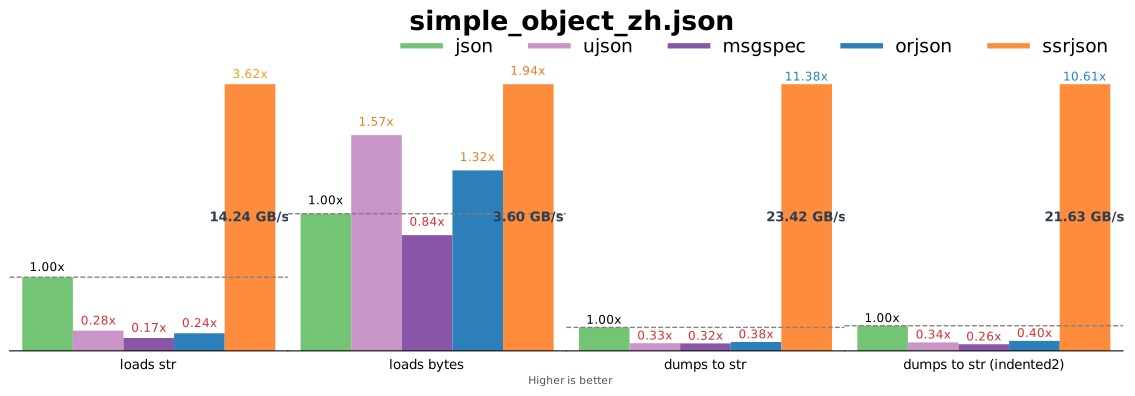
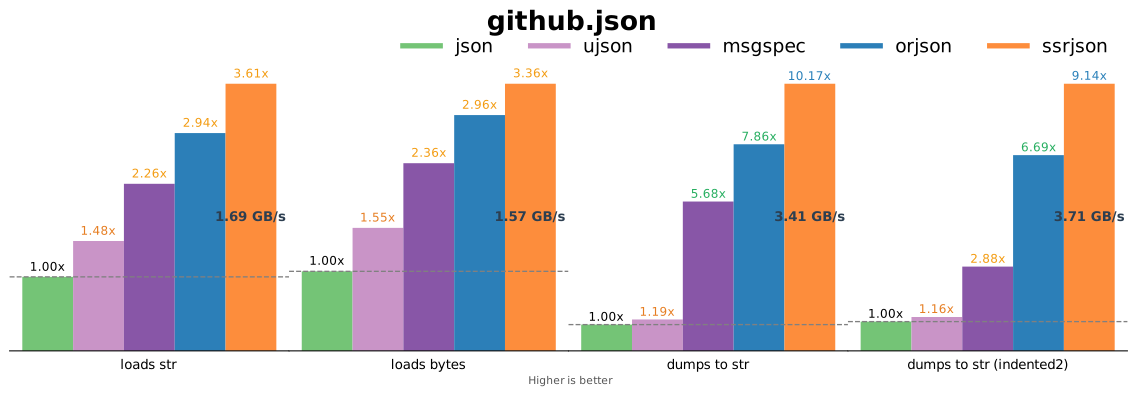
For loads and dumps, the results are as follows. Charts 1–4 correspond to loads from str, loads from bytes, dumps to str, and dumps to str with indent=2 (again, msgspec requires an extra msgspec.json.format layer for indentation). As discussed earlier, other third-party libraries perform poorly for loads from str; ssrJSON's loads from str is fast because it uses the correct approach (no UTF-8 transcoding). Even in loads from bytes, where other libraries are strongest, ssrJSON remains the fastest; ujson ranks second because it avoids extra overhead. For the two dumps-to-str tests, ssrJSON achieves more than 10x the standard library's speed thanks to efficient SIMD memory copying. Since orjson and msgspec output bytes, the benchmark times orjson.dumps(...).decode("utf-8") and msgspec.json.encode(...).decode("utf-8"); their serialization is not especially fast and also pays for decode, so their poor results are expected. ujson.dumps outputs str directly, but because it internally encodes to UTF-8 and then decodes back, it loses performance — even slower than orjson.dumps plus a decode.
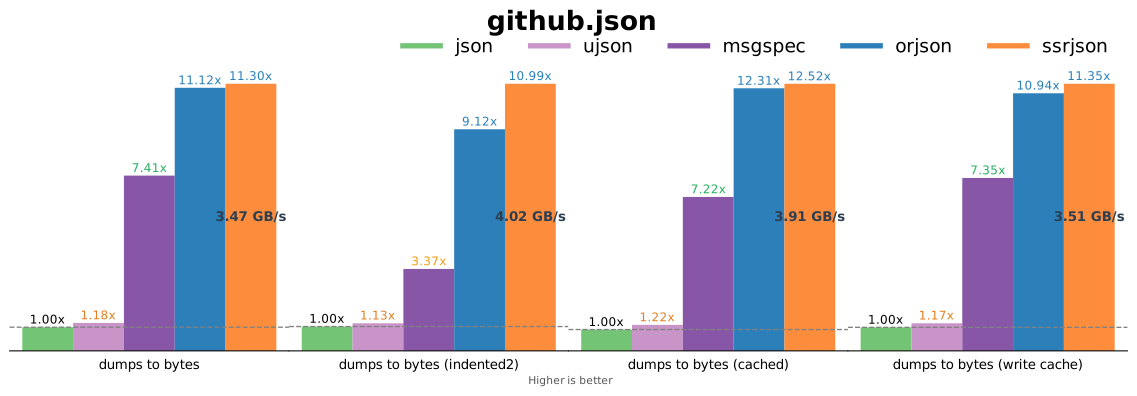
For ASCII inputs, ssrJSON also performs excellently. For the common benchmark case github.json, which is mostly ASCII, ssrJSON is still the fastest — slightly faster than orjson or more. On some purely ASCII cases, ssrJSON and orjson each has its own merits; check the full report.
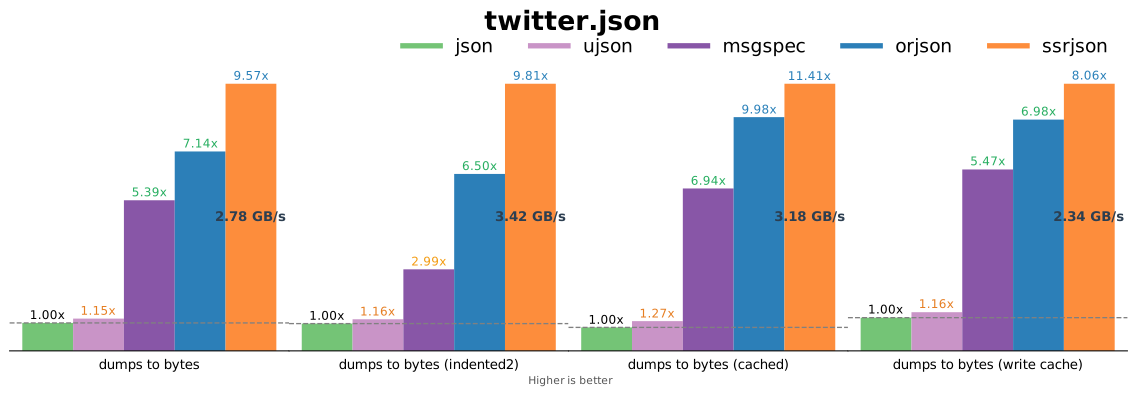
Another common benchmark case is twitter.json, which closely resembles real-world JSON transmitted over networks; ssrJSON shows a clear advantage.

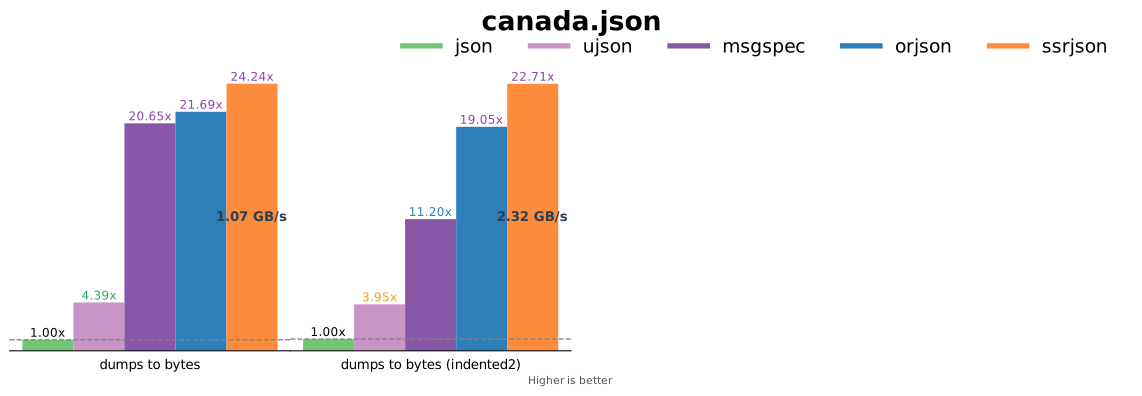
canada.json is also a common benchmark case, consisting almost entirely of floating-point numbers. ssrJSON uses Dragonbox for float-to-string conversion; its dumps and dumps_to_bytes speed directly demonstrates Dragonbox's power. On the loads side, float parsing is based on yyjson's efficient parsing algorithm, and overall ssrJSON outperforms other libraries by a wide margin. Because this case contains no non-ASCII characters, the two UTF-8-cache-related tests are equivalent to the standard dumps_to_bytes test and omitted.

What Should You Do?
Use ssrJSON
If your project is highly performance-sensitive, consider replacing your current JSON library with ssrJSON. You can install it via pip:
pip install ssrjson
Or you can integrate the source directly into your C/C++ project. Note that ssrJSON supports only the Clang toolchain.
In terms of usage, ssrJSON's dumps/loads APIs are designed to be compatible with the standard library, so replacement is straightforward. If you currently use the standard library json for dumps/loads, you can try a drop-in replacement with:
import ssrjson as json
If you are using other third-party libraries, you can replace them with ssrjson.dumps_to_bytes and ssrjson.loads. For performance-critical paths, use ssrjson.dumps_to_bytes to speed things up. Depending on your project, you can globally disable UTF-8 cache writes for dumps_to_bytes via ssrjson.write_utf8_cache(False), or disable cache writes per-call by passing is_write_cache=False to dumps_to_bytes. The overall migration should be simple, but note that while ssrJSON is parameter-compatible, it does not guarantee support for every feature the standard library provides; see README: features for details.
In some cases ssrJSON may not meet your needs. It is currently in Beta: core functionality is stable, but some support remains limited.
- ssrJSON is not overly picky about operating systems, but it has hardware requirements: it currently supports only 64-bit x86 or ARM. On x86, the CPU must support at least SSE4.2, i.e. x86-64-v2. (Per Steam's hardware survey, 99.5% of x86 CPUs meet this.)
- Some secondary features are missing: e.g.
loadsdoes not implementobject_hook, and it does not yet support free-threading (no-GIL) Python builds (both are on the feature roadmap). Workarounds: submit a PR implementing the feature; file a feature request and wait for it to be implemented. - You may encounter bugs. Workarounds: submit a PR to fix them while ssrJSON is still in Beta, or file issues to help it mature.
For more details, check the project README. If this article helped you, consider giving ssrJSON a free star :)
Comments NOTHING